Sitecore Search - Keeping PII Out of Your Search Integration
Summary
We recently integrated Sitecore Search into a client's SitecoreAI website using the official @sitecore-search/react widget SDK.
Out of the box, the SDK talks directly from the visitor's browser to Sitecore's Discover API at discover.sitecorecloud.io. That works great, but the client had a hard privacy requirement:
No personally identifiable information (PII) may be sent to Sitecore Search.
Specifically:
- No client IP address on any request
- No cookie-based tracking that carries information about the user
When the browser calls Sitecore Search directly, two things are sent by default:
-
The client IP address. Every request originates from the user's machine, so Sitecore Search sees and logs the real visitor IP at the network level. There is nothing you can remove from a JSON body to hide this, it's the TCP source address of the connection itself.
-
Tracking and analytics data. The SDK's analytics layer attaches user context (geo/IP fields, a visitor identifier, and behavioral events) and relies on tracking cookies to attribute activity to a person over time.
So the challenge was to keep search fully functional, but make it structurally impossible for the browser to hand Sitecore either the user's IP or any user-identifying tracking data.
The Solution
We addressed it with two independent changes:
- Setting
trackConsent={false}on the SDK provider to disable all consent-based tracking and analytics data assembled in the browser. - A Next.js reverse proxy that re-originates the request server-side and scrubs the body, so Sitecore Search only ever sees the server's IP.
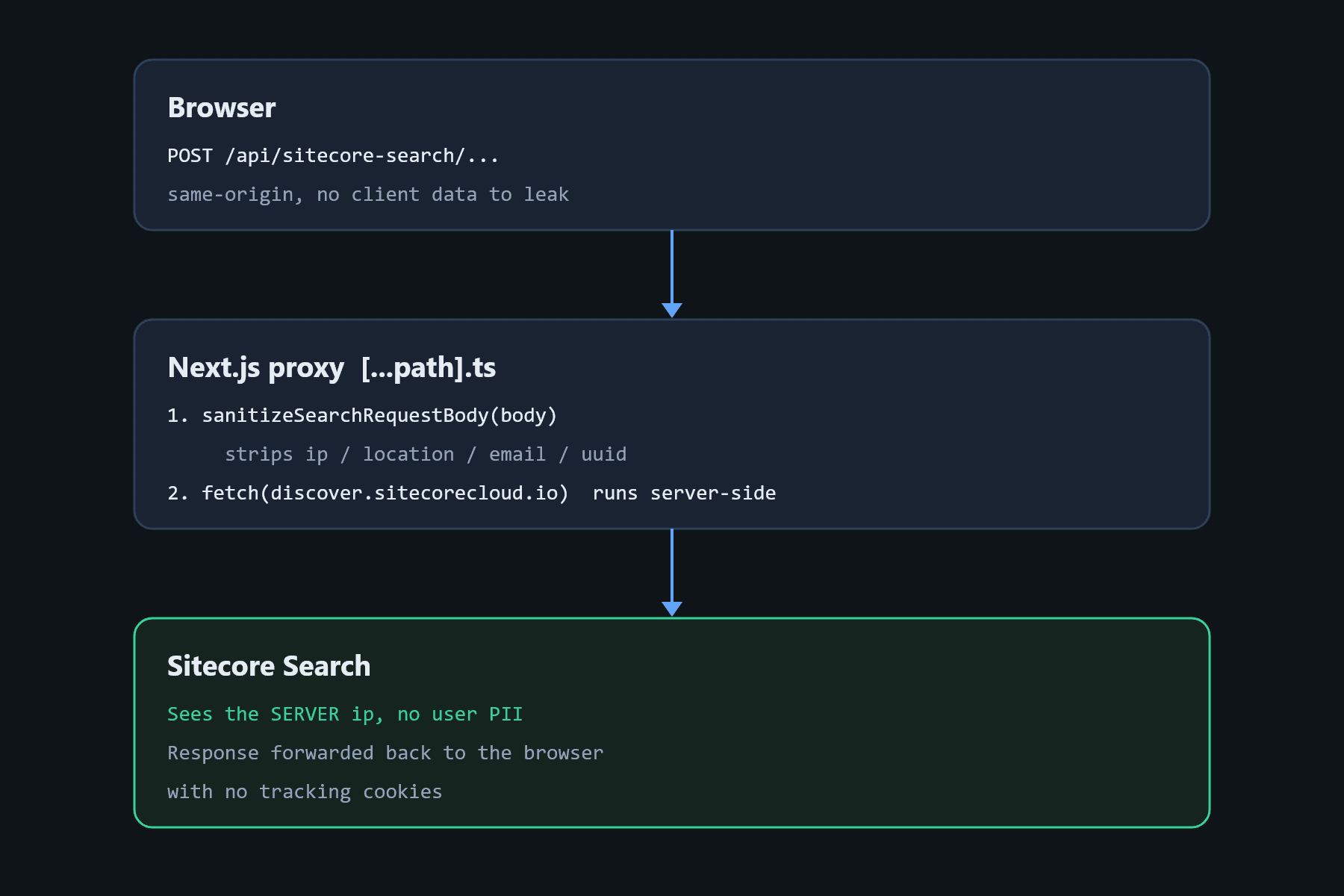
The important architectural idea is that the browser stops talking to Sitecore Search entirely. Instead, it talks to our own API route, and our server relays the request onward. Because the outbound call is made from our server, Sitecore's connection originates from the server's IP, not the visitor's. The client's IP is never used.
Disable tracking with trackConsent={false}
The Sitecore Search widgets are wrapped in a WidgetsProvider. Two settings do the heavy lifting here: pointing the SDK at our proxy via serviceHost, and switching off consent-based tracking via trackConsent={false}. With consent tracking off, the SDK does not build or emit the user-tracking payloads it normally would.
'use client';

import { Environment, WidgetsProvider } from '@sitecore-search/react';
import type { ReactNode } from 'react';

interface SearchProviderProps {
  children: ReactNode;
  discoverDomainId?: string;
}

export function SearchProvider({ children, discoverDomainId }: SearchProviderProps) {
  return (
    <WidgetsProvider
      env={process.env.NEXT_PUBLIC_SEARCH_ENV as Environment}
      customerKey={process.env.NEXT_PUBLIC_SEARCH_CUSTOMER_KEY}
      // Point the SDK at OUR proxy instead of discover.sitecorecloud.io
      serviceHost={process.env.NEXT_PUBLIC_SEARCH_SERVICE_HOST ?? '/api/sitecore-search'}
      discoverDomainId={discoverDomainId ?? process.env.NEXT_PUBLIC_SEARCH_DOMAINID}
      publicSuffix={true}
      useToken={true}
      // Disables all consent-based tracking & analytics
      trackConsent={false}
    >
      {children}
    </WidgetsProvider>
  );
}
It's worth calling out that these two settings do two different jobs. serviceHost reroutes where requests go (through our proxy), while trackConsent={false} controls what the SDK assembles (no tracking payloads). You need both: the proxy handles the network-level IP, and the consent flag handles the application-level tracking data.
Build the IP-stripping proxy
The proxy is a Next.js catch-all API route /api/sitecore-search/[...path].ts. It accepts whatever the SDK would have sent to Sitecore Search, optionally scrubs residual PII from the JSON body, and forwards the request from the server. Because fetch() runs server-side, Sitecore sees the request coming from our server's IP, and the visitor's IP is physically absent from the upstream connection.
import { sanitizeSearchRequestBody } from '@/lib/sitecore-search/sanitize-request';
import { NextApiRequest, NextApiResponse } from 'next';

const UPSTREAM_BASE = process.env.SITECORE_SEARCH_API_BASE!;
const API_KEY = process.env.SITECORE_SEARCH_API_KEY!;
const PII_SCRUBBING_ENABLED = process.env.SEARCH_PII_SCRUBBING_ENABLED !== 'false';

export default async function handler(req: NextApiRequest, res: NextApiResponse) {
  if (req.method === 'OPTIONS') {
    res.status(200).end();
    return;
  }

  if (req.method !== 'GET' && req.method !== 'POST') {
    res.setHeader('Allow', ['GET', 'POST', 'OPTIONS']);
    res.status(405).json({ error: 'Method not allowed' });
    return;
  }

  let pathSegments = Array.isArray(req.query.path) ? req.query.path : [req.query.path as string];

  // When serviceHost is set, the SDK prepends /api/ to all its paths.
  // Strip that prefix so we forward to the correct Sitecore URL shape.
  if (pathSegments[0] === 'api') {
    pathSegments = pathSegments.slice(1);
  }

  // The Discover endpoint needs the domain ID at the end: /discover/v2/{domainId}
  const DOMAIN_ID = process.env.NEXT_PUBLIC_SEARCH_DOMAINID;
  if (pathSegments[0] === 'discover' && DOMAIN_ID && !pathSegments.includes(DOMAIN_ID)) {
    pathSegments = [...pathSegments, DOMAIN_ID];
  }

  // Rebuild the query string from the incoming request, skipping the internal
  // "path" param that Next.js adds for the catch-all route.
  const forwardedParams = new URLSearchParams();
  for (const [paramName, paramValue] of Object.entries(req.query)) {
    if (paramName === 'path') {
      continue;
    }
    const singleValue = Array.isArray(paramValue) ? paramValue[0] : paramValue;
    forwardedParams.set(paramName, singleValue ?? '');
  }

  const queryString = forwardedParams.toString();
  const upstreamPath = pathSegments.join('/');
  const upstreamUrl = queryString
    ? `${UPSTREAM_BASE}/${upstreamPath}?${queryString}`
    : `${UPSTREAM_BASE}/${upstreamPath}`;

  let forwardedBody: string | undefined;
  if (req.method === 'POST' && req.body) {
    // Scrub any residual PII (e.g. geo.ip, user.email) from the JSON body
    const requestBody = PII_SCRUBBING_ENABLED
      ? sanitizeSearchRequestBody(req.body)
      : req.body;
    forwardedBody = JSON.stringify(requestBody);
  }

  try {
    // This fetch runs on the server — Sitecore Search sees the server IP, not the client's.
    const upstreamResponse = await fetch(upstreamUrl, {
      method: req.method,
      headers: {
        'Content-Type': 'application/json',
        Authorization: API_KEY,
      },
      body: forwardedBody,
    });

    const responseBody = await upstreamResponse.text();
    const contentType = upstreamResponse.headers.get('content-type') ?? 'application/json';
    res.setHeader('Content-Type', contentType);
    res.status(upstreamResponse.status).send(responseBody);
  } catch (error: unknown) {
    const errorMessage = error instanceof Error ? error.message : 'Unknown error';
    console.error('[sitecore-search proxy] upstream error:', errorMessage);
    res.status(502).json({ error: 'Search service unavailable' });
  }
}
The key thing to understand here is why the IP disappears. The client IP isn't something you can delete from a request body, it's the source address of the TCP connection. By making the browser call our server, and our server call Sitecore Search, we re-originate the connection. Sitecore's logs record the server's IP as the source, and the visitor's IP never reaches Sitecore at all.
Scrub residual PII from the body
Disabling consent tracking removes the big tracking payloads, but some request shapes still carry fields we'd rather Sitecore never see (a geo.ip placeholder, a precise geo.location, or a user.email). The proxy runs every POST body through a small sanitizer as a defense.
export function sanitizeSearchRequestBody(body: unknown): unknown {
  if (!body || typeof body !== 'object') return body;

  const clone = structuredClone(body) as Record<string, unknown>;

  // Search query payloads:  { context: { geo, user } }
  // Event payloads:         { value: { context: { geo, browser } } }
  // Sanitize both shapes.
  sanitizeContext(clone.context as Record<string, unknown> | undefined);
  const value = clone.value as Record<string, unknown> | undefined;
  if (value) {
    sanitizeContext(value.context as Record<string, unknown> | undefined);
  }

  return clone;
}

function sanitizeContext(context: Record<string, unknown> | undefined): void {
  if (!context) return;

  const geo = context.geo as Record<string, unknown> | undefined;
  if (geo) {
    geo.ip = '';
    // Remove visitor location (not the search filter geo — those live in search.filter)
    delete geo.location;
  }

  const user = context.user as Record<string, unknown> | undefined;
  if (user) {
    delete user.email;
    delete user.uuid;
  }
}
The sanitizer strips anything directly identifiable from the request body: IP, location, email, and the visitor UUID.
Configuration
The whole thing is driven by environment variables, so PII scrubbing can even be toggled off in non-production environments:
# ====== Sitecore Search Proxy (PII scrubbing) ======
SITECORE_SEARCH_API_KEY=01-xxxxxxxx-xxxxxxxxxxxxxxxxxxxxxxxxxxxxxxxx
# Upstream Sitecore Search host (no trailing slash).
SITECORE_SEARCH_API_BASE=https://discover.sitecorecloud.io
# The browser SDK talks to this local route instead of Sitecore directly.
NEXT_PUBLIC_SEARCH_SERVICE_HOST=/api/sitecore-search
# Set to "false" to pass requests through as-is. Default: true.
SEARCH_PII_SCRUBBING_ENABLED=true
How the request flows
Once everything is wired up, the browser only talks to our own origin, and our server does the rest:
Conclusion
With two specific changes we met the client's privacy bar without sacrificing search. Setting trackConsent={false} stops the SDK from assembling and emitting consent-based tracking and analytics data in the browser, and a server-side proxy re-originates every request so Sitecore only ever records our server's IP.
The key insight is that IP privacy is a network problem, not a payload problem. You can't delete the source IP from a request, so you have to change who makes the request. Moving the outbound call to the server does exactly that. Disable what the client sends, control where it goes, and scrub what remains.
Bonus - Sitecore Search Proxy Note
In the event you need to write a custom api to handle other scenarios before your request goes to Sitecore Search, you can follow this exact example. Rember to enable trackConsent={false} if you want to keep analytics tracking.
If you do want to keep the original __ruid visitor id for search analytics, you need to make two changes. First, in the sanitizer, remove the delete user.uuid line so the pseudonymous id is still sent in the request body. Second, in the proxy API route, forward the Set-Cookie header from Sitecore Search back to the browser after the upstream fetch call:
    const setCookieHeader = upstreamResponse.headers.get('set-cookie');
    if (setCookieHeader) {
      res.setHeader('Set-Cookie', setCookieHeader);
    }
That lets Sitecore Search set the __ruid cookie on the client and tie repeat requests to the same pseudonymous visitor. It is not directly identifiable (no name, email, or IP), but it is still a persistent visitor identifier, so only enable it if that fits your privacy requirements.